Horses of Hoofprint Bay Steam Deck Guide: Performance, Controls, and Setup
Learn how Horses of Hoofprint Bay runs on Steam Deck, the best control setups from real players, demo and pricing details, and practical tips for the hand-drawn horse sim from Thogli Studios.
Does Horses of Hoofprint Bay Run Well on Steam Deck?
Yes. Early hands-on footage shows that the whole thing runs excellently on the Steam Deck, with the reviewer noting there is nothing special to configure — the settings menu offers little to change because the game is graphically simple. That simplicity is a strength here: Horses of Hoofprint Bay is a hand-drawn 2D point-and-click barn builder, so it does not stress the handheld's hardware the way 3D titles do.
A few facts worth knowing before you install:
- The official system requirements list Linux / Steam Deck as the minimum OS on the SteamOS side, so it is designed to run natively on the handheld rather than through Proton workarounds.
- Steam's automated compatibility badge still reads "Unknown" on the demo's store page, but community reports and gameplay videos confirm it works well in practice.
- Steam Cloud support is included, so progress syncs between a Deck and a desktop PC.
One caveat from footage: the occasional stutter and glitching seen in one Steam Deck gameplay video was blamed on the creator's capture card, not the game itself, so don't let that discourage you.
Best Steam Deck Controls for Horses of Hoofprint Bay
Because this is a point-and-click game at heart, the control question comes up constantly. The good news: you have several viable options, and you can remap buttons directly on the Deck at any time.
| Setup | How It Works | Best For |
|---|---|---|
| Touchscreen only | Tap and drag directly on the display | Casual play; younger players; care mini-games |
| Community controller layout | WASD mapped to the d-pad, Q/E on the left stick, right trackpad acting as the mouse cursor | Riding, training, and general navigation |
| External mouse + keyboard | USB-C or Bluetooth peripherals | Players who want desktop-style precision |
| Hybrid | Normal controls for riding, touchscreen for lessons and grooming | The most recommended all-around approach |
Real players in the Horses & Video Games community report success with both approaches — one mapped WASD to the d-pad with the right trackpad handling clicks, while another used the touchscreen specifically for riding lessons and standard controls everywhere else. The gameplay footage creator attached a mouse and keyboard but notes his daughter plays entirely with touch.
What to Expect From the Game
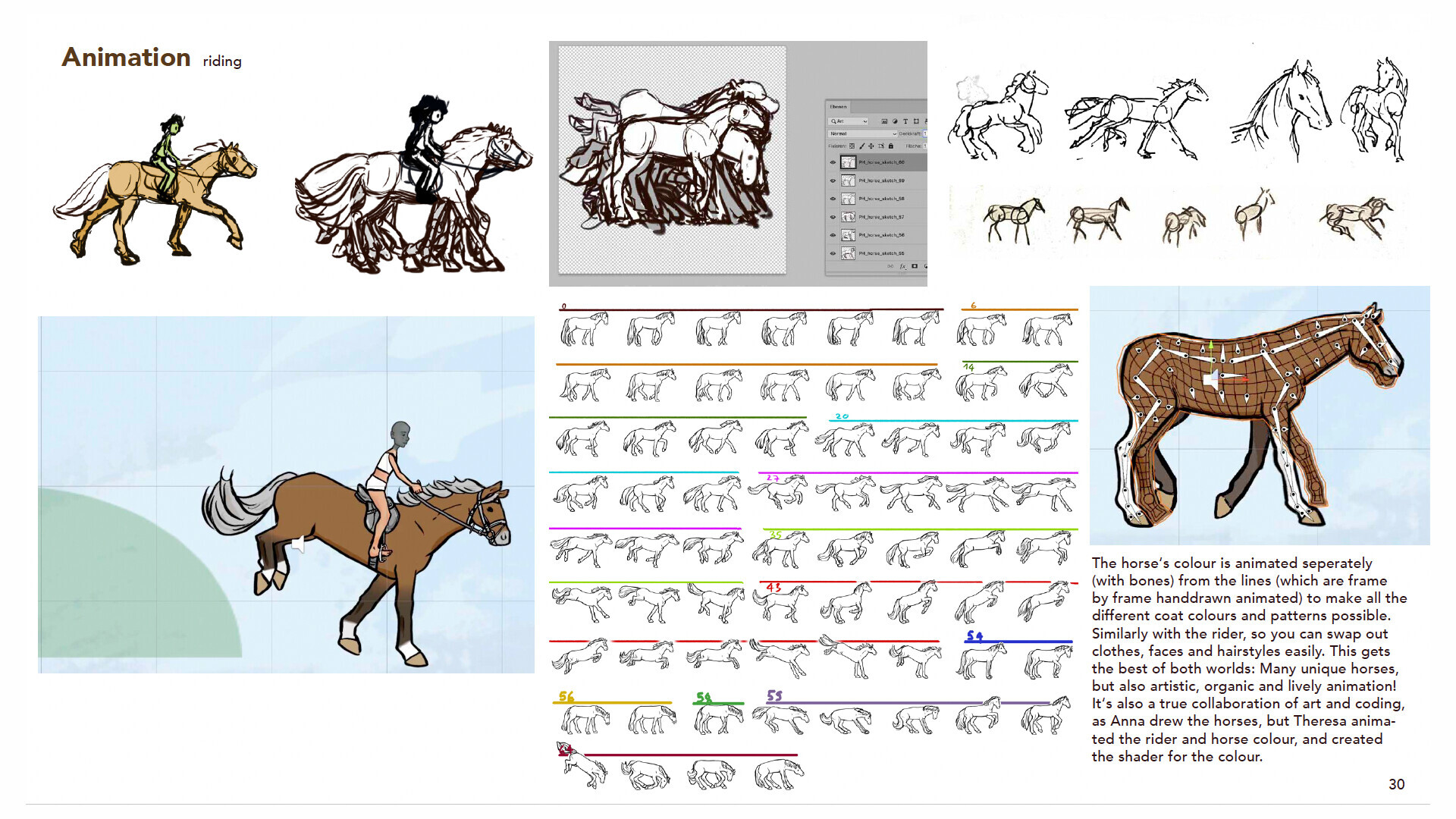
Horses of Hoofprint Bay is built by Thogli Studios, a small German team of self-described horse girls, and published by The Mane Quest. Everything on screen is hand-drawn — the developers state the game contains no generative AI assets, which is a big part of why supporters rally behind it.
Core gameplay loops include:
- Horse care — grooming with brush, comb, and hoof pick, bathing, feeding, and watering to prevent saddle sores and abscesses.
- Training and competition — pole work, Caprilli tests, desensitization drills, and show jumping/cross country tournaments for prize money.
- Breeding — foals inherit coloring, white patterns, and personality traits from carefully planned pairings.
- Barn building — expand from a run-down shack into a full stud farm with riding arenas, paddocks, and hired staff.
- Exploration — trail rides through forests, beaches, and mountains.
- Learning — an in-game library teaches real equestrian knowledge in language simple enough for younger players.
The game has 16 achievements and effectively no ending — you can play indefinitely, though the video's creator jokes that anyone reaching two million in-game days has bigger problems than an integer overflow. Community sentiment is strongly positive: the demo holds a 99% "Overwhelmingly Positive" rating across more than 1,100 reviews, and players on the Steam Community hub praise how faithfully it recaptures the feel of classic horse games like Pferd und Pony: Mein Pferdehof.

Performance, Settings, and Practical Notes
Because the art is 2D and the simulation logic is modest, the Deck handles it comfortably — there are no frame-rate concerns reported in available footage, and the reviewer never touched a graphics menu. Battery drain should be gentle compared to demanding 3D releases, making it a good couch or travel game.
A few practical observations from actual play:
- Some interface screens can feel crowded on the Deck's 7-inch display, particularly the horse care interactions where multiple tools and statuses are visible at once.
- Care mini-games (picking hooves, combing out dirt) are easier with touch than with the trackpad cursor, per community consensus.
- A reported typing annoyance on the Deck — awkward text entry when naming your character — comes up in community threads, so some players keep a keyboard handy just for the intro.
- Accessibility-minded players have asked about mouse-only movement on the community forums, and the point-and-click design means touch input covers most needs without WASD at all.
Demo, Pricing, and Save Compatibility
Before committing, you can try the free demo — and it is a genuinely useful trial, since it remains available even after launch.
| Version | Price | Notes |
|---|---|---|
| Demo (October build) | Free | Limited to 25 in-game days; saves carry into the full game |
| Full game | $26.99 | 15% launch discount brings it to $22.94 |
| Supporter Pack | ~$7 | Includes a printable coloring book and a 50+ page PDF art book with sketches and production bloopers |
Two details matter for Deck players. First, only saves from the October demo transfer to the full release — the older February demo saves do not, though the February build remains downloadable via a separate Steam branch. Second, the launch discount was tied to the November 4 release, so check the current price on the Steam store before buying.
FAQ
Is Horses of Hoofprint Bay officially Verified for Steam Deck? Not yet — Steam lists compatibility as "Unknown." In practice, footage and player reports show it running excellently with no tweaking required, and the developers list Steam Deck as a supported minimum OS.
Can you play it entirely with the touchscreen? Yes. The game is point-and-click by design, and players confirm handling lessons, grooming, and navigation with touch alone, though remapping the physical controls makes riding sessions more comfortable.
Do demo saves carry over to the full game? Saves from the October Steam Next Fest demo are compatible with the full release. Saves from the February demo are not.
Do horses die in the game? According to the in-game library discussed in gameplay footage, horses do not die from issues like being overweight — the game favors education and care over punishment, which suits its family-friendly audience.
Is there a Nintendo Switch or mobile version? Not at launch. Reviewers and fans have openly hoped for a Switch or mobile port, but nothing has been announced as of early November 2026.
What languages does it support? The interface and subtitles are available in 21 languages, including English, German, French, Spanish, Japanese, Korean, and Simplified Chinese.
Related Guides
Horses of Hoofprint Bay android: Is There a Mobile Version in 2026?
Searching for Horses of Hoofprint Bay android? The hand-drawn horse sim is currently PC-only on Steam. Here is the platform status, price, demo info, and mobile workarounds.
Horses of Hoofprint Bay iOS: Can You Play It on iPhone or iPad?
Horses of Hoofprint Bay iOS availability explained: the hand-drawn horse sim is out now on Steam for PC. See platforms, pricing, features, and mobile options.
Horses of Hoofprint Bay Mac Support: Can You Play on macOS?
Horses of Hoofprint Bay launched without native Mac support. Here's the official platform list, what the developers say about macOS, and the workarounds Mac owners are trying.
Horses of Hoofprint Bay Mobile: Can You Play It on a Phone or Tablet?
Is there a Horses of Hoofprint Bay mobile version? Learn where this hand-drawn horse sim is playable, Steam Deck support, free demo details, pricing, and more.